

This article covers the following platforms
 MSFS 2024
 MSFS 2020
 ATS
 FSX
 Prepar3D
ChasePlane separates camera location, purpose, and movement into different concepts. Learn these concepts before you edit a camera.
Use one name for each concept
| Concept | Meaning |
|---|---|
| Camera mode | The main area where the camera operates. |
| View | One camera position, direction, and zoom. |
| View type | The purpose of a saved or generated view. |
| Group | A set of movement and behavior settings that views can share. |
| Motion model | The basic way that a group reacts to aircraft movement and camera input. |
| Theme | The category and color that organize a group. |
These concepts work together. They do not describe the same item.
Camera mode
ChasePlane has three public camera modes:
| Camera mode | Camera location |
|---|---|
| Internal | In or on the aircraft interior. |
| External | On or around the aircraft exterior. |
| World | At a position in the simulator world. |
A camera mode can contain many views and groups.
Learn how to select a camera mode and view.
View and view type
A view is one camera position with its direction, zoom, options, and assigned group.
A view type describes the job of that view. Examples include a pilot view, FlyBy view, Tower view, and Traffic view.
Some views are saved in your camera library. ChasePlane generates other World views from the current aircraft, airport, or traffic information.
Do not use view type as another name for camera mode. For example, Traffic is a World view type, not a fourth camera mode.
Group
A group supplies shared movement and behavior settings to its assigned views.
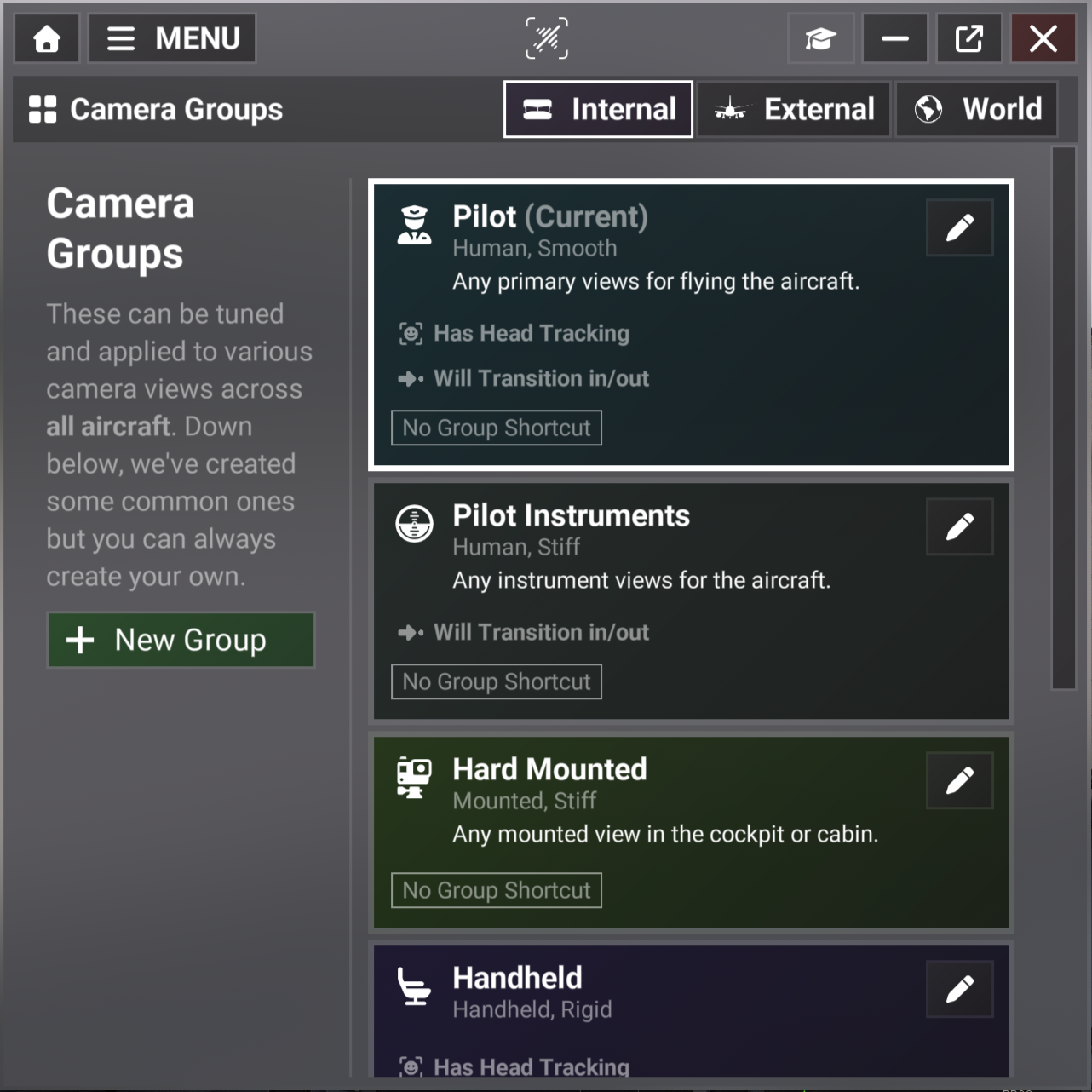
The Groups page separates Internal, External, and World groups. A group card can show:
- The group name and current state.
- The motion model and firmness name.
- Head Tracking and transition status.
- The saved Group Shortcut.
- The action that opens the Group Editor.
Changing a group can affect all views that use that group. A view keeps its own position and view-specific options.
Motion model
A motion model belongs to a group. It defines the main movement rule for all views in that group.
ChasePlane uses these public motion-model names:
- Human
- Mounted
- Floating
- Handheld
- Chase
- Spot View
The motion model is not the complete camera behavior. Camera Physics, Motion Effects, and view options can also change the final result.
Theme
A theme organizes a group by purpose and supplies its color and icon. Examples include Pilot in Command, Cabin, Mounted, and Runway.
A theme does not control camera movement. The motion model and group settings control movement.
Example relationship
The default Internal Pilot view uses the Pilot group. That group uses the Human motion model and the Pilot in Command theme.
| Item | Example value |
|---|---|
| Camera mode | Internal |
| View | Pilot |
| Group | Pilot |
| Motion model | Human |
| Theme | Pilot in Command |
This structure lets several views share behavior without sharing the same camera position.