This article covers the following platforms
 MSFS 2024
 MSFS 2020
 ATS
ATS FSX
FSX Prepar3D
FreedomFox / Fox2 installs directly into the Community folder — the folder where MSFS loads add-ons from.
-
Unzip the .zip file you downloaded from our store.
-
Quit the simulator.
-
Move the add-on into the Community folder.
Microsoft Store version
%LOCALAPPDATA%\Packages\Microsoft.FlightSimulator_8wekyb3d8bbwe\LocalCache\Packages\CommunitySteam version
%APPDATA%\Microsoft Flight Simulator\Packages\CommunityIf you installed the simulator to a custom location, look for the Community folder in that location. For example, if you installed to
D:\Games\MSFS, the Community folder is here:D:\Games\MSFS\Community -
Launch the simulator.
-
From the MAIN MENU, select World Map.
-
In the upper left corner, click the image of a vehicle.
-
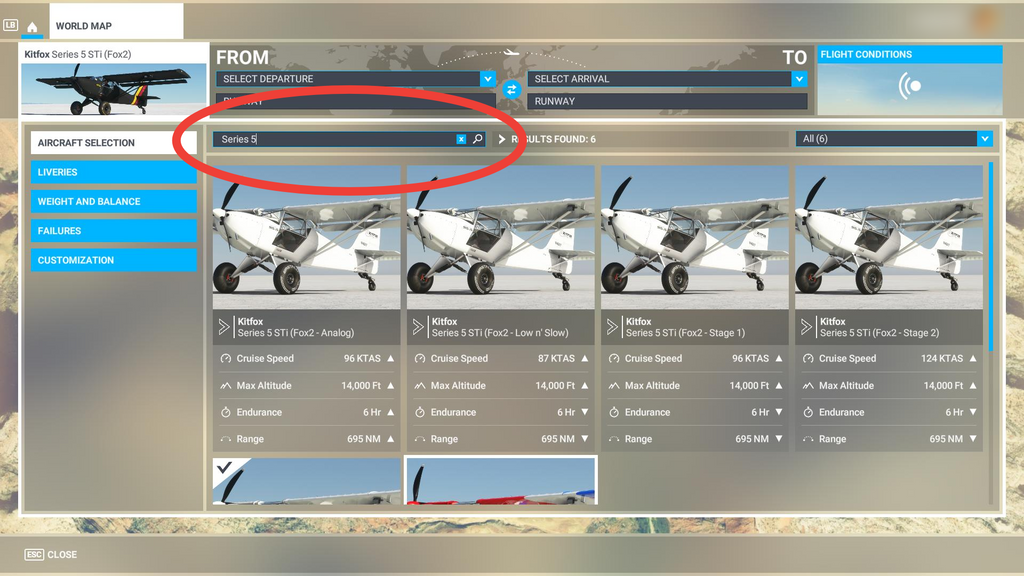
Search for “Series 5” in the aircraft search bar.