

This article covers the following platforms


American Truck Simulator loads mods from a mod folder in your Documents. A mod is a single .scs file. Copying it there is only half the job — ATS ignores a mod until you activate it in the Mod Manager.
Install the mod
- Quit American Truck Simulator.
- Unzip the download. Inside is one or more
.scsfiles. - Move the
.scsfile into your mod folder:
C:\Users\USERNAME\Documents\American Truck Simulator\mod - Launch American Truck Simulator and stop at the profile selection screen, before loading a save.
- Select the profile you play, then select Mod Manager beside it.
- Double-click the mod to move it from Available to Active.
- Set its priority using the load order below.
- Confirm, then load your profile.
A correct mod folder holds the .scs file itself, not a folder containing it:
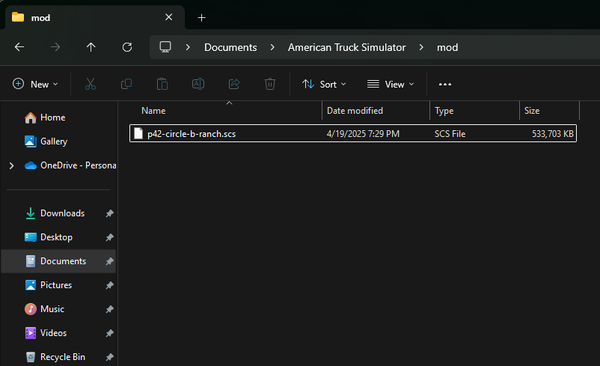
Mods are activated for the profile you selected. If you play more than one profile, repeat this for each.
Updating a mod you already have? Replace its .scs file with the new one. Its place in the load order is kept.
Load order
When two mods change the same thing, the one higher in the Mod Manager wins: ATS loads the top item last, so it overwrites everything below it. If a mod seems to do nothing, its position is the first thing to check.
Arrange your active mods from highest priority at the top to lowest at the bottom:
| Priority | Mod category |
|---|---|
| 12 — Highest | Miscellaneous accessories and mods |
| 11 | Custom engines and miscellaneous sounds |
| 10 | Sound fixes pack |
| 9 | Weather mods |
| 8 | Truck and trailer liveries or mods |
| 7 | Trailers |
| 6 | Trucks |
| 5 | Traffic density and behavior mods |
| 4 | AI traffic packs |
| 3 | Core game mods |
| 2 | → //42 Yards — place here |
| 1 — Lowest | Map mods |
Put //42 Yards immediately above your map mods. That lets Yards override map content without taking priority over trucks, traffic, weather, sounds, or other gameplay mods.
If the mod does not appear
ATS checks the mod against the game versions listed in its manifest, so a game update can flag a working mod as incompatible until we ship an update.
- Check your game version in the bottom-right corner of the profile selection screen.
- If ATS updated recently, the mod needs an update from us. One usually follows shortly, and you will be notified.
- Check your Downloads for a newer version.
- If your game is older than the version the mod supports, update ATS.
The MSFS and ATS editions of a product are separate purchases, and an MSFS download contains no .scs file.
- Open your Downloads and check which edition you own.
- If it is the MSFS edition, get the ATS edition from its product page.
- Unzip that download. The
.scsfile is inside.
- Quit American Truck Simulator.
- Confirm the
.scsfile sits directly in the mod folder, not inside a subfolder. - Launch ATS and open the Mod Manager from the profile selection screen again.
- Double-click the mod so it shows Active. Present in the list is not the same as active.
- Check its position against the load order. A mod higher in the list overwrites the one below it. If another mod changes the same location, disable it and test again.
Still stuck? Delete the mod, download a fresh copy, and reinstall it with the game closed.